In Microsfot Excel, sometimes we not only play with amounts but with words too, like in Microsoft Word. And the result is a little bad compared if we create in Microsoft Word.
To make the result in a good order, between 2 words or more, so we use CONCATENATE formula ---> functioning to consolidate 2 words or more to be a word or sentence.
The formula is "=CONCATENATE(TEXT1,TEXT2, ….. )"
Example :
1. in coloumn A1 write " budi's sister went to the market together with her school mates"
In coloumn A3 write " and in the evening they went to swim by bus"
So in coloumn A9 write formula =CONCATENATE(A1,” “,A3)
Notes : sing “ “ used for replacing space
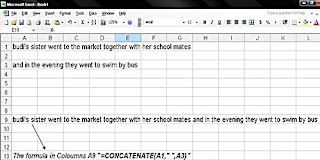
the result become in coloumn A9 : " budi's sister went to the market together with her school mates and in the evening they went to swim by bus.”
after consolidating, the result become a long sentence so that when we want to print it, it will over the sheets. To make it not over the sheet, more tidy by using below step :
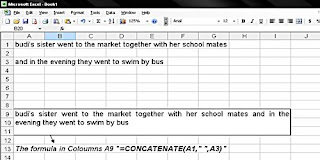
in coloumn A9 till I11 sorted then click "merge and center".
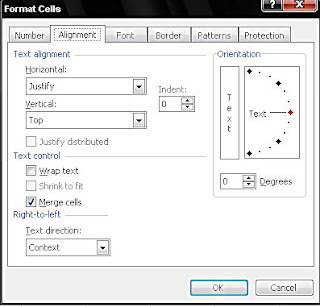
But, after consolidating usually the text become down in the cell, so in coloumn A9 right click your mouse choose "cells a alignment --> horizontal choose justify then in vertical choose top then ok.
2. And how is it become if we want consolidate above words with amounts. Above example added :
in coloumn A5 write "and the fare per person was"
in coloumn A7 write "20000"
So in coloumn A9 =concatenate(A1,” “,A3,” “,A5,” “,TEXT(A7,"Rp, 00,00.00"))
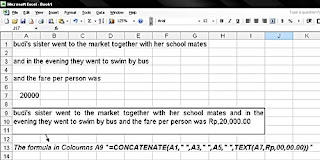
The result will be :
“budi's sister went to the market together with her school mates and in the evening they went to swim by bus and the fare per person was Rp, 20,000".
Ok,.see you again..
Warm regards
Read More ...
To make the result in a good order, between 2 words or more, so we use CONCATENATE formula ---> functioning to consolidate 2 words or more to be a word or sentence.
The formula is "=CONCATENATE(TEXT1,TEXT2, ….. )"
Example :
1. in coloumn A1 write " budi's sister went to the market together with her school mates"
In coloumn A3 write " and in the evening they went to swim by bus"
So in coloumn A9 write formula =CONCATENATE(A1,” “,A3)
Notes : sing “ “ used for replacing space

the result become in coloumn A9 : " budi's sister went to the market together with her school mates and in the evening they went to swim by bus.”
after consolidating, the result become a long sentence so that when we want to print it, it will over the sheets. To make it not over the sheet, more tidy by using below step :
in coloumn A9 till I11 sorted then click "merge and center".
But, after consolidating usually the text become down in the cell, so in coloumn A9 right click your mouse choose "cells a alignment --> horizontal choose justify then in vertical choose top then ok.


2. And how is it become if we want consolidate above words with amounts. Above example added :
in coloumn A5 write "and the fare per person was"
in coloumn A7 write "20000"
So in coloumn A9 =concatenate(A1,” “,A3,” “,A5,” “,TEXT(A7,"Rp, 00,00.00"))

The result will be :
“budi's sister went to the market together with her school mates and in the evening they went to swim by bus and the fare per person was Rp, 20,000".
Ok,.see you again..
Warm regards